01. Give it context
Start with your company website. Review the suggested profile details, add your audience and brand voice, and connect the tools the task needs.

Prepare content. Research prospects. Keep an eye on your market. Riplics AI gives your team AI agents that work with your company context and connected tools—from the first brief to a result you can review.
Invitation-only access · $5 starter credit with a new account
“Turn this article into LinkedIn posts that sound like us.”
Review, edit, then approve the next action.
For founders, lean marketing teams, and agencies juggling recurring work.
Give your content teammate your audience, brand voice, and source material. Get an editorial plan and channel-specific drafts you can edit before publishing.
Talk to us about this use case“Turn our latest article into a week of LinkedIn posts for our target audience.”What you get backAn editorial calendar and editable post drafts
Review the copy, then approve publication with a connected account.
Start with a brief, then open the workflow when you need more control. This is the Riplics editor: follow the steps, inspect what moves between them, and refine how a recurring task runs.
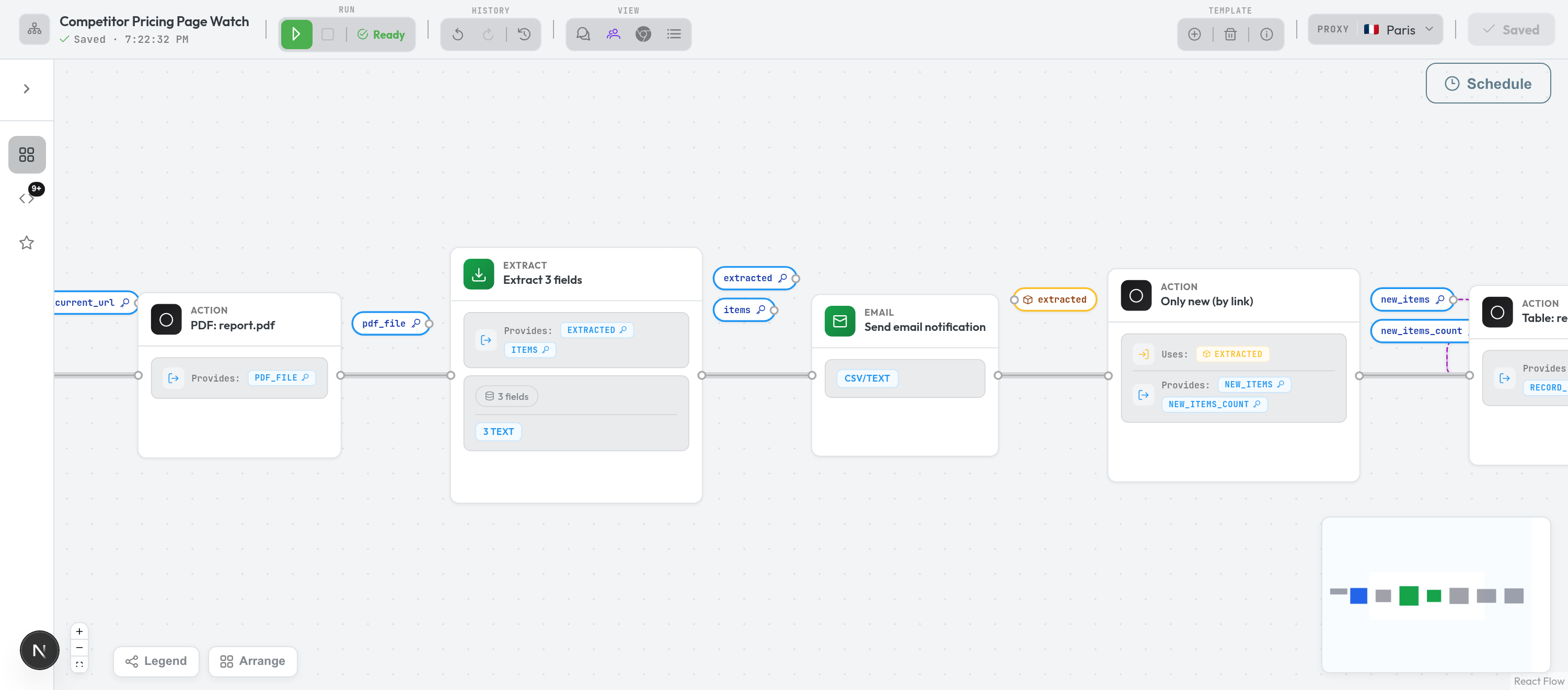
the work, made visible →A real product screenshot. The visual editor is there when you want to inspect or customise the process behind an agent’s task.
Start with your company website. Review the suggested profile details, add your audience and brand voice, and connect the tools the task needs.
Choose an agent and describe the outcome. For your own repeatable process, demonstrate the task in the browser and review the skill it creates.
Check the deliverable, respond to questions, and approve gated actions. Once the process fits, run it again or set a schedule for recurring work.
Built for work you can review
Bring together your content, communication, and business tools. Connect the accounts a task needs and manage them in the right company workspace.
Capabilities depend on the service, account permissions, and task. Included platform tools use credits; external accounts have their own connection setup.
Your workflow defines the checks. Choose the sources, schedule, and approval steps that fit the job. When a task needs attention, use its questions, results, and execution history to decide what to do next. Start with one source, review the first digest, and expand the workflow when it fits your needs.
Demonstrate a task in the browser, review the skill it creates, and reuse it. Open the workflow editor when you want to refine the individual steps.
Connect the services your team uses. Browser automation extends your workflows to tasks that need to happen on a website.
Keep findings in records, save deliverables, and export tables to CSV. Build on previous runs instead of starting from a blank conversation.
Prepare drafts and configure approval steps before sensitive actions. Inspect what is proposed, make edits where supported, and decide what happens next.
Prefill Company Profile from your website, then review and save your audience, brand voice, and business details. Give agents a shared starting point.
Switch company workspaces, manage members and roles, and control workflow sharing. Keep each company’s context and connected accounts in the right place.
New accounts include $5 in starter credit. Usage is metered across AI, browser time, and paid integration tools, with a breakdown you can inspect in the app.
Model cost × 3.33
Token usage is priced from the model’s underlying cost, so smaller models stay inexpensive and larger models remain transparent.
$0.002 / minute
Metered while a cloud browser is running. The minimum browser charge is $0.02 per run, including short jobs.
$0.01 / credit
Credit usage varies by tool and operation. Check the tool’s rate and your usage breakdown in the app.
Start with a repeatable job whose result is easy to review: a competitor digest, a content calendar, a keyword plan, or a prospect research list. Set the brief, check the first result, then decide whether to run it on a schedule.
You can start with an existing agent and a brief. For a process specific to your business, demonstrate it in the browser and review the resulting skill, or use the visual workflow editor to define the steps.
Approval behaviour depends on the task and its settings. Content and outreach can be prepared as drafts, and approval gates can pause sensitive steps for review. Check those settings and the connected account before enabling a recurring task.
Yes. Company Profile can analyse your website and suggest details such as your company description and brand information. You choose what to apply, edit it, and save the context your assistants will use.
You can switch between company workspaces and manage their members and roles. Company profiles and connected accounts are scoped to the selected company, and workflow sharing can be managed explicitly.
Riplics is currently invitation-only. Request access below; the team will follow up by email. New accounts receive $5 in starter credit. AI, browser, and paid integration usage are metered, with charges visible in the app. Current rate details are shown in the pricing section.
Request an invitation to Riplics AI. We’ll follow up by email to learn about your team and the first piece of recurring work you want to delegate.